Social Media Content Calendar for Your Business
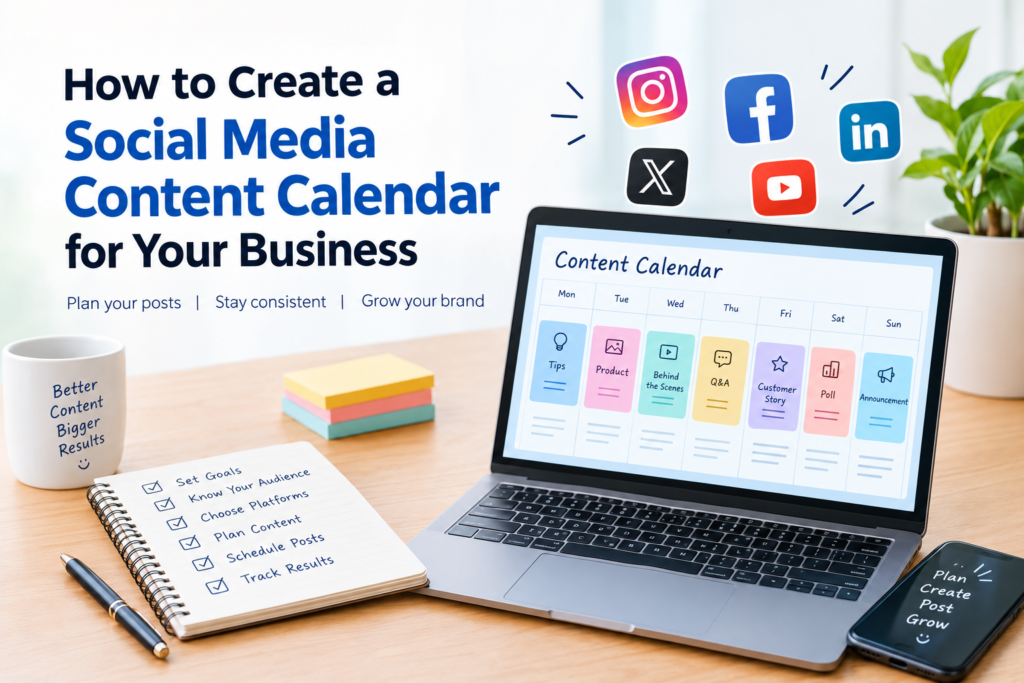
Managing social media for a business can become difficult when you have to think of new post ideas every day. Without a clear plan, posts may become irregular, content ideas may get repeated, and important business updates can be missed. A social media content calendar helps you organize your ideas, plan posts in advance, and maintain a consistent online presence.
What Is a Social Media Content Calendar?
A social media content calendar is a schedule that shows what you will post, where you will publish it, and when it will go live. It can include post topics, captions, creative designs, publishing dates, platform names, and campaign details. You can create one using a spreadsheet, a calendar app, or a project management tool.
For small businesses, a content calendar makes social media easier to manage. Instead of deciding what to publish at the last minute, you can plan content that supports your business goals and connects with your audience.
Why Does Your Business Need a Social Media Content Calendar?
Posting consistently is easier when you have a plan. A content calendar gives you a clear view of upcoming posts and helps you balance promotional content with useful information and audience engagement.
1. Maintain a Consistent Posting Schedule
A planned schedule helps you avoid long gaps between posts. Choose a realistic posting frequency that fits your time, resources, and audience. Consistency matters more than committing to a schedule that you cannot maintain.
2. Save Time and Reduce Last-Minute Stress
Planning several posts in advance allows you to prepare captions, visuals, and hashtags together. This reduces the pressure of creating content at the last minute and gives you more time to focus on other business activities.
3. Keep Your Content Organized
A calendar helps you track planned, drafted, approved, and published posts. It also makes it easier to identify repeated topics and maintain a consistent brand voice across your social media platforms.
4. Connect Content With Business Goals
Every post should have a purpose. Your content may aim to increase brand awareness, educate customers, encourage engagement, showcase products, or generate enquiries. Planning helps you create posts that support these goals rather than publishing without direction.
How to Create a Social Media Content Calendar for Your Business
Creating a content calendar does not need to be complicated. Start with a simple plan and improve it as you learn what works for your business.
1. Set Clear Social Media Goals
First, decide what you want to achieve through social media. For example, a local business may want to reach more people in its area, while an online store may want to attract product enquiries or sales. Clear goals help you choose relevant topics and measure your progress.
2. Understand Your Target Audience
Think about the people you want to reach, their interests, their common questions, and the problems your business can solve. Review comments, direct messages, customer feedback, and frequently asked questions for content ideas that are relevant to your audience.
3. Choose the Right Social Media Platforms
You do not need to publish on every platform. Choose channels that suit your audience, content style, and business goals. For example, Instagram can be useful for visual storytelling, while LinkedIn may be more suitable for professional services and business-focused content.
4. Decide on Your Content Categories
Content categories, also known as content pillars, help you plan a balanced mix of posts. Common categories include educational tips, product or service highlights, behind-the-scenes updates, customer experiences, frequently asked questions, and promotional offers. Choose categories that make sense for your business.
5. Plan Your Posting Frequency
Decide how often you can realistically publish on each platform. Consider the time needed to research, write, design, review, and publish each post. Begin with a manageable schedule and adjust it according to your results and available resources.
6. Add Ideas and Publishing Dates to Your Calendar
Create a weekly or monthly calendar and add each planned post. Include the publishing date, platform, topic, format, caption status, creative asset, and call to action. Leave some space for timely updates, local events, and relevant trends.
For example:
Date: Monday
Platform: Instagram
Content pillar: Education
Topic: Three common social media mistakes businesses make
Format: Carousel
Call to action: Save this post for later
Status: In production
Keeping these details together makes it easier to track progress and identify missing content before publication.
7. Prepare Captions and Creative Materials
Once your topics are planned, prepare captions, images, short videos, carousels, or other creative materials. Keep your brand colors, tone, and message consistent. Review every post for clarity, accuracy, spelling, and relevance before publishing.
8. Review Performance and Improve Your Plan
A content calendar should not remain unchanged forever. Review relevant metrics such as reach, engagement, profile visits, link clicks, and enquiries. Identify which topics and formats perform well, then use those insights to improve your next calendar.
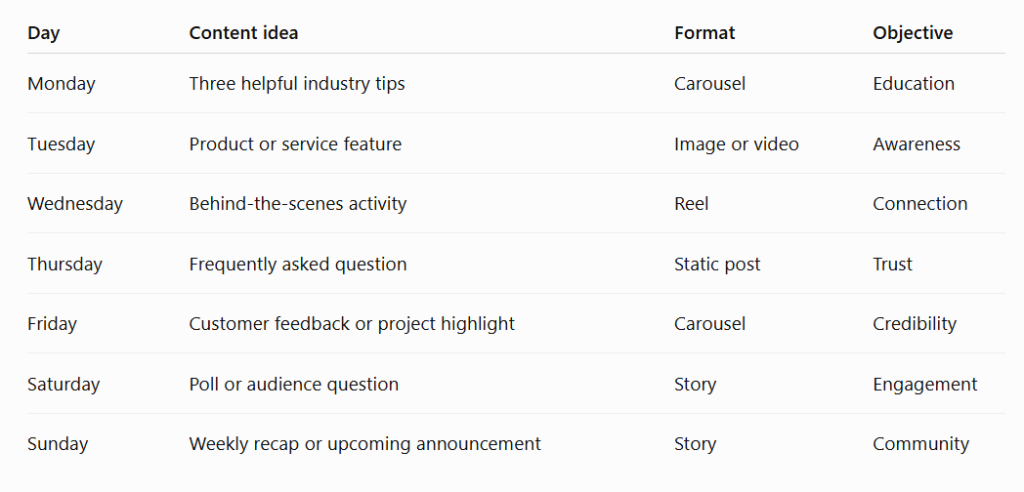
Sample Social Media Content Calendar
Here is a sample weekly plan for a small business.
What Should You Include in a Social Media Content Calendar?
A useful social media content calendar should make every post easy to understand and track. Include these details where relevant:
Publishing date and time; social media platform; content topic; content category; post format; caption or draft link; image or video link; call to action; approval status; and performance notes.
You can start with only a few columns in a spreadsheet. Add more details when your workflow becomes more complex. The best calendar is one that you can update and use consistently.
Free Tools to Plan Your Social Media Content
You can manage your calendar with simple tools without investing in expensive software. Google Sheets or Excel can help you organize dates and post details. Google Calendar can provide reminders, while Canva can help you prepare social media graphics. Some social media management platforms also offer scheduling and performance reporting features.
Choose tools based on your actual needs, budget, and workflow. A well-maintained spreadsheet can be enough for a small business that is just starting to plan its social media content.
Common Content Calendar Mistakes to Avoid
Avoid planning only promotional posts, copying trends that do not fit your brand, ignoring audience questions, and setting an unrealistic posting schedule. Do not treat the calendar as a fixed plan that can never change. Leave room for relevant opportunities, respond to your audience, and review performance regularly.
Final Thoughts
A social media content calendar helps businesses plan ahead, stay organized, and publish content with a clear purpose. By setting goals, understanding your audience, choosing suitable platforms, and reviewing results, you can build a more consistent social media routine. Start with a simple weekly plan, learn from your performance, and improve your calendar over time.
Frequently Asked Questions
What is the best way to create a social media content calendar?
Start by setting your goals, identifying your audience, selecting your platforms, and choosing content categories. Then organize post ideas and publishing dates in a spreadsheet or calendar tool.
How far in advance should I plan social media content?
Many businesses find it useful to plan content one to four weeks ahead. The right timeframe depends on your workflow, the type of business, and how often your content needs to change.
Can a small business use a free content calendar?
Yes. A spreadsheet or calendar app can be enough to organize post dates, topics, captions, and creative materials. You can upgrade to a dedicated scheduling tool if your needs grow.
How often should I update my social media content calendar?
Review it regularly, ideally every week, and check performance at suitable intervals. Update upcoming posts when audience needs, business priorities, or timely opportunities change.
About the Author
Santhwin S Ambattu is an aspiring digital marketer based in Calicut, Kerala, with an interest in helping small businesses build their online presence. His interests include social media management, SEO, content strategy, paid advertising, and WordPress website development. Through his website, santhwin.com, he shares practical digital marketing insights and ideas to help businesses grow in the digital world.Review it regularly, ideally every week, and check performance at suitable intervals. Update upcoming posts when audience needs, business priorities, or timely opportunities change.